I've been learning to program the uxn virtual machine. I've had a lot of fun so far.
The creators of uxn (100 rabbits) and other enthusiasts have already created and shared some really great resources for learning about uxn. But I felt something was missing for me personally.
Specifically, I wanted a single diagram that showed me the whole machine I'm working with; zoomed-out, highlighting all the important parts.
I bet this already exists somewhere. But I wasn't finding it. So I made the diagram I wanted to see.
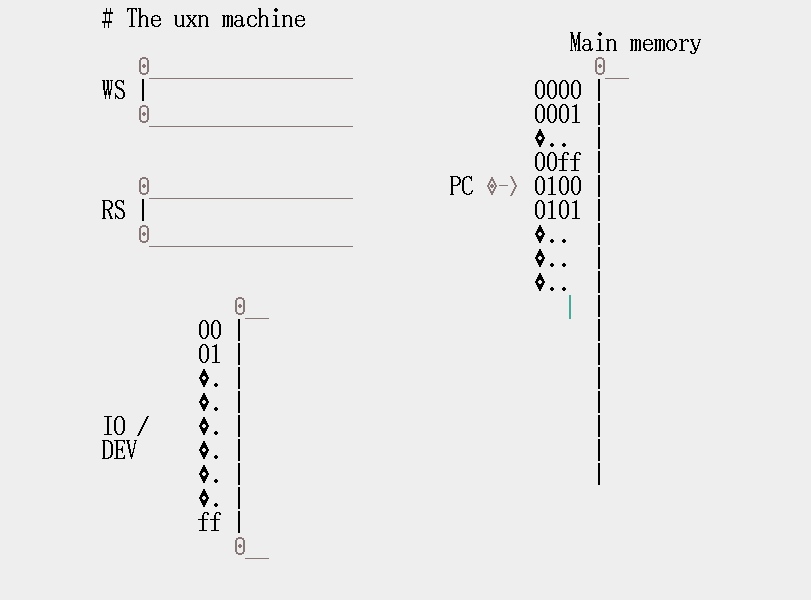
That's it! That's the whole machine. I think. (The diagram could use some cleaning up, but it gets the job done for me.)
Key reference resources (to use together with this diagram):
OK, fine, since you asked... Here's how it works.
(I think it's something like this, anyway.)
If you're reading this and I'm wrong, I'd love to receive a toot from you about it @dabreese00@mas.to.
Each of these parts you see in the diagram (WS, RS, IO/dev, and Main memory) is just a different type of memory. That means they store bytes.
The IO/dev and Main memory sections are addressable. That means you can read or write any individual stored byte, on demand, by specifying that byte's address.
The WS and RS are stacks. That means they are not addressable, instead you can mostly only add or remove bytes to or from one end of the stack, one byte at a time.
The PC is the program counter. It points at an address in Main memory, and moves around to different addresses while the program executes.
uxn uses the program counter to keep track of what computation step to do next.
When you load a ROM file into uxn, it copies the contents of that ROM (a bunch of bytes) into Main memory, and sets the program counter to the address 0100. Then it begins executing.
uxn looks at the single byte in Main memory that the program counter is currently pointing at.
It treats that byte as an opcode, and performs the operation specified by that opcode.
Then it moves the program counter forward to the next byte (unless the opcode says otherwise).
The first thing you'll do when learning to program the uxn machine, is learn a handful of useful opcodes, which you can use to tell uxn what to do.
The IO/dev section is short for "input output/devices". It's special because while it looks and acts like memory, it's not actually about storing data. It's really your secret window to the outside world.
If uxn reads and writes these bytes, it can have effects like putting pixels on the screen, or responding to keyboard presses, or other cool stuff.
To see all the ins and outs of how this works, the Varvara specification is the source.
Input and output is the other first thing you'll learn about how to program uxn.
A ROM file is the format for programs that uxn knows how to read. But usually we don't write a ROM file directly, because it's too hard. It looks basically like this:
0000000 0060 a02a 2000 2880 a037 4000 2a80 a037
0000010 4001 2c80 8037 8002 172f 01a0 8021 3720
0000020 8000 3628 8021 3728 0280 2f80 a017 7ff0
0000030 0880 a037 d6f0 0a80 a037 b2f0 0c80 6c37
0000040 6600 ffff 7eff 183c
0000048
uxntal is a programming language that was also created by 100 rabbits.
uxntal is much easier for humans to read and write than a ROM file.
A program that you write in uxntal can be translated automatically into a ROM file, for uxn to read.
To learn how to read and write uxntal, and to translate it into ROM files, Devine Lu Linvega's website (link above) is a good resource, and also compudanzas has a really helpful tutorial (including a video).
I think that's all I'm going to cover here for now. I was really just going to share the diagram, but I got a little carried away.
It's fun to learn what awesome stuff you can do with a very simple computer!